Chat for the travels system

A travel assistant on your website

One window where the customer asks a question, picks a trip and leaves a request. It answers from your own texts, remembers what it hears and hands a complete request to your travels system.

  • One script tag
  • Runs on your travels system
  • Requests arrive in your travels admin system
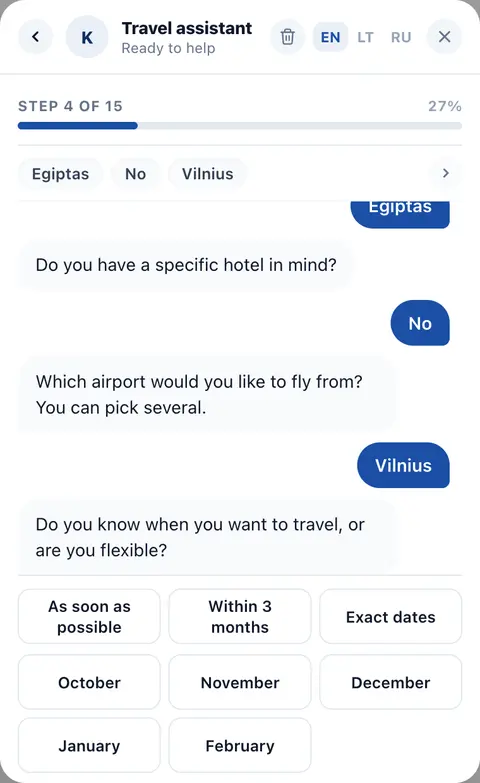
The request wizard: the customer taps through destination, dates and travellers in the chat window.
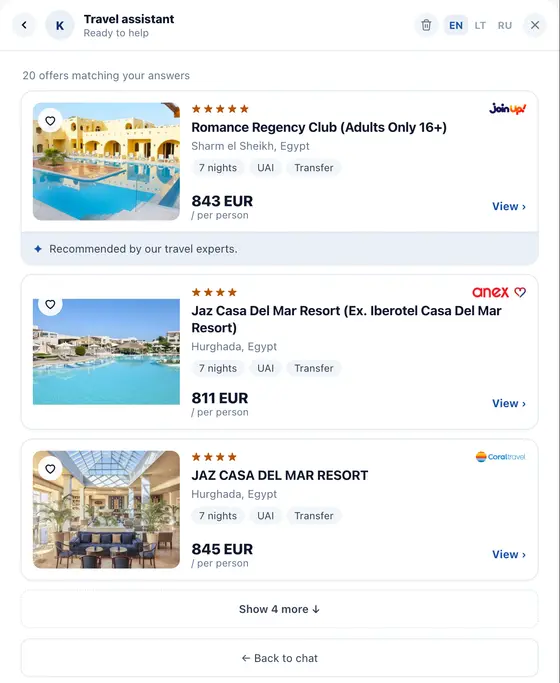
Offers matching the request, shown in the chat right after it is sent: hotels with tour operator, price per person and a link to each.
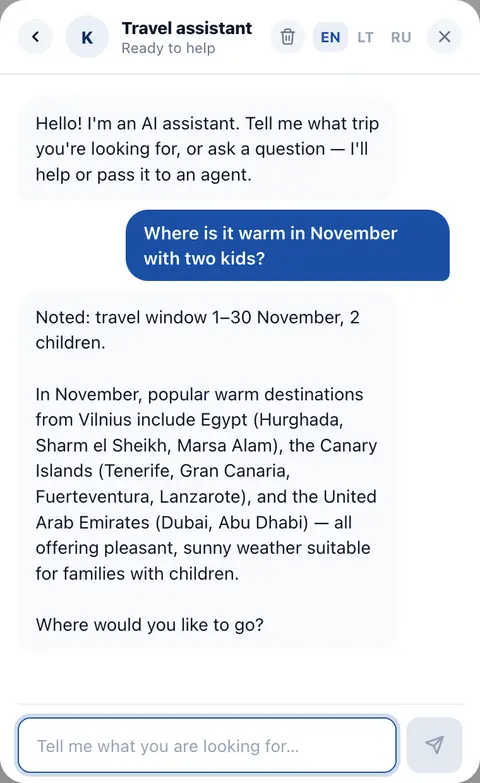
The AI assistant answering a customer’s question in the chat window.
Live chat
2 min
from the first tap to a submitted request
Any
language: the chat speaks the ones you set in your admin panel
1
script tag on your page
12–15
questions in the wizard, so every request arrives complete
What the customer gets

Two ways to leave a request, one window

A customer who knows what they want taps through the wizard. A customer who is still deciding talks to the assistant, and the request fills itself along the way.

Live

Request wizard

The customer answers by tapping, in about two minutes.

  • Destination, dates, travellers, budget, hotel, meals, contacts.
  • Naming a specific hotel skips the questions that no longer apply.
  • The request lands in your system and the customer sees offers right away.
Live

AI assistant

Answers from the information you provide and helps an undecided customer choose.

  • Visas, seasons, travelling with children.
  • Notes what the customer said and fills in the request for them.
  • Never invents prices. What it does not know goes to your agent.
  • Speaks the languages you set in your admin panel.
Coming soon

Live chat

An agent joins the same conversation and takes over from the assistant.

  • The customer stays in the same window with the full history.
  • After hours the assistant answers and leaves the request for the morning.
How it works

From a question to a request in your travels system

The assistant is a consultant, not a second form. It answers, records what it hears, and the wizard asks only what is still missing.

  1. 01

    The customer asks

    They write a question or tap through the wizard. Both live in the same window, on every page of your site, phone first.

    • Any page
    • Type or tap
  2. 02

    The assistant answers from your texts

    Visa rules, seasons, what you sell. Every reply comes from your knowledge entries, pages and contacts, not from the model’s memory. No entry, no guess: the question goes to your agent.

    • Knowledge entries
    • Pages
    • Contacts
  3. 03

    The request fills itself

    Destination, dates, who is travelling: what the customer said is recorded as they say it. When they are ready, the wizard asks only what is left and confirms each answer in one sentence.

    • Fewer questions
    • Corrected by saying so
  4. 04

    It lands in your travels system

    The same request your website form sends today, in the same place, so nothing changes for your agents. The customer sees matching tour operator offers right away.

    • Same request queue
    • Offers in the chat
Embed

One script tag

Paste it before the closing body tag of your site. The loader is under 1 KB and brings the widget in once the page is idle. That is the whole integration on your side.

index.htmlHTML
<script
  id="waavo-chat-embed"
  src="https://chat-widget.waavo.com/embed.js"
  data-host="youragency.waavo.com"
  data-language="en"
  async
></script>
  • Sealed off from your page

    The widget renders inside its own shadow DOM. Your stylesheet cannot break it and its styles cannot leak into your site.

  • Configured by your travels host

    data-host names your travels project. Destinations, airports, hotels, offers, languages and the assistant’s texts all come from it. Nothing else to set up.

  • Updates without you

    The widget is served from our CDN. New features and fixes reach your page without a release on your side.

FAQ

Questions agencies ask

Overview

What does the customer see on my site?

A round button in the corner of every page. It opens one window with a greeting, the request wizard and, where you have switched it on, the AI assistant. The window is sized for a phone and scrolls inside itself.

Where do the requests go?

Into your travels admin system as a holiday-wish request, the same one your website form sends today. Your agents work the way they already do.

Does the assistant quote prices or book?

No. It answers questions, helps the customer choose and fills in the request. Prices and booking stay with your agents and your booking engine.

What if it does not know the answer?

It says so and hands the question to your agent. It answers only from the knowledge entries, pages and contacts in your project, never from general memory.

Which languages does it speak?

The ones you set in your admin panel. The widget opens in your site’s language and the customer can switch at any time.

Integration

Do I need the travels system for it?

Yes. The chat reads destinations, hotels, airports, offers and your texts from your travels project and sends every request into it. Without travels there is nothing for it to search or fill in.

How do I add it to my website?

One script tag with your travels host. We switch the assistant on for your agency in the admin and fill the knowledge entries with you.

Will it interfere with my site’s styles?

No. The widget renders inside its own shadow DOM: your CSS cannot reach it and its CSS cannot reach your page.

Can I try it with real content first?

Yes. The demo on this page runs on the Waavo demo agency. Ask it anything and send a request; nothing reaches a real agency.

For travel businesses

Tell us how you work. We’ll show you where Waavo fits.

Every agency, tour operator and travel startup runs differently. Answer a short inquiry about your business and daily challenges, and a Waavo specialist prepares personal recommendations for a free call.

  • 7 questions
  • About 2 minutes
  • No obligation
What we’ll ask about
  1. Your businessType of company, team size and main market
  2. What you sellFlights, hotels, packages, tours or something else
  3. How you sell todayOffice, phone, website or supplier portals
  4. Your challengesIn your own words, what takes the most time